
Overview
Akita Apps is a small suite of browser-based productivity tools built around a philosophy of minimalism and respect for user attention. In an era where software increasingly relies on subscriptions, analytics, and feature bloat, Akita takes the opposite approach: no subscriptions, no trackers, just focused tools that get out of the way. The company offers two core products: Dopamine Destroyer, a website blocker designed to eliminate distractions without guilt or complexity, and Hayaku Notes, a rapid note-capture extension for quickly saving ideas. Both are Chrome extensions aimed at individuals who want to reclaim their focus without paying a monthly fee. Marketed as "focus tools for modern minds," Akita positions itself against over-engineered alternatives like Freedom or Cold Turkey, offering a lighter, free-to-use alternative for people who need simple, effective boundaries.
The brand’s aesthetic is clean and intentional, with a no-nonsense tone that matches its product philosophy. By removing pricing barriers and unnecessary features, Akita Apps targets a broad audience: students, remote workers, creatives, and anyone who struggles with digital distractions. The offering is currently limited to two tools, but the focus on quality over quantity could serve as a foundation for a larger ecosystem of minimalist productivity apps.
Key Features
Dopamine Destroyer: An Instant Website Blocker Dopamine Destroyer lets users block distracting websites with a single toggle. Unlike other site blockers that require complex scheduling or whitelist configurations, this extension is designed for immediacy. Users simply turn it on when they need to focus, and distracting domains are blocked without ceremony. The extension doesn’t shame users with guilt messages or statistics; it simply enforces the block. This approach aligns with the dopamine fast concept, helping users break the cycle of compulsive browsing.
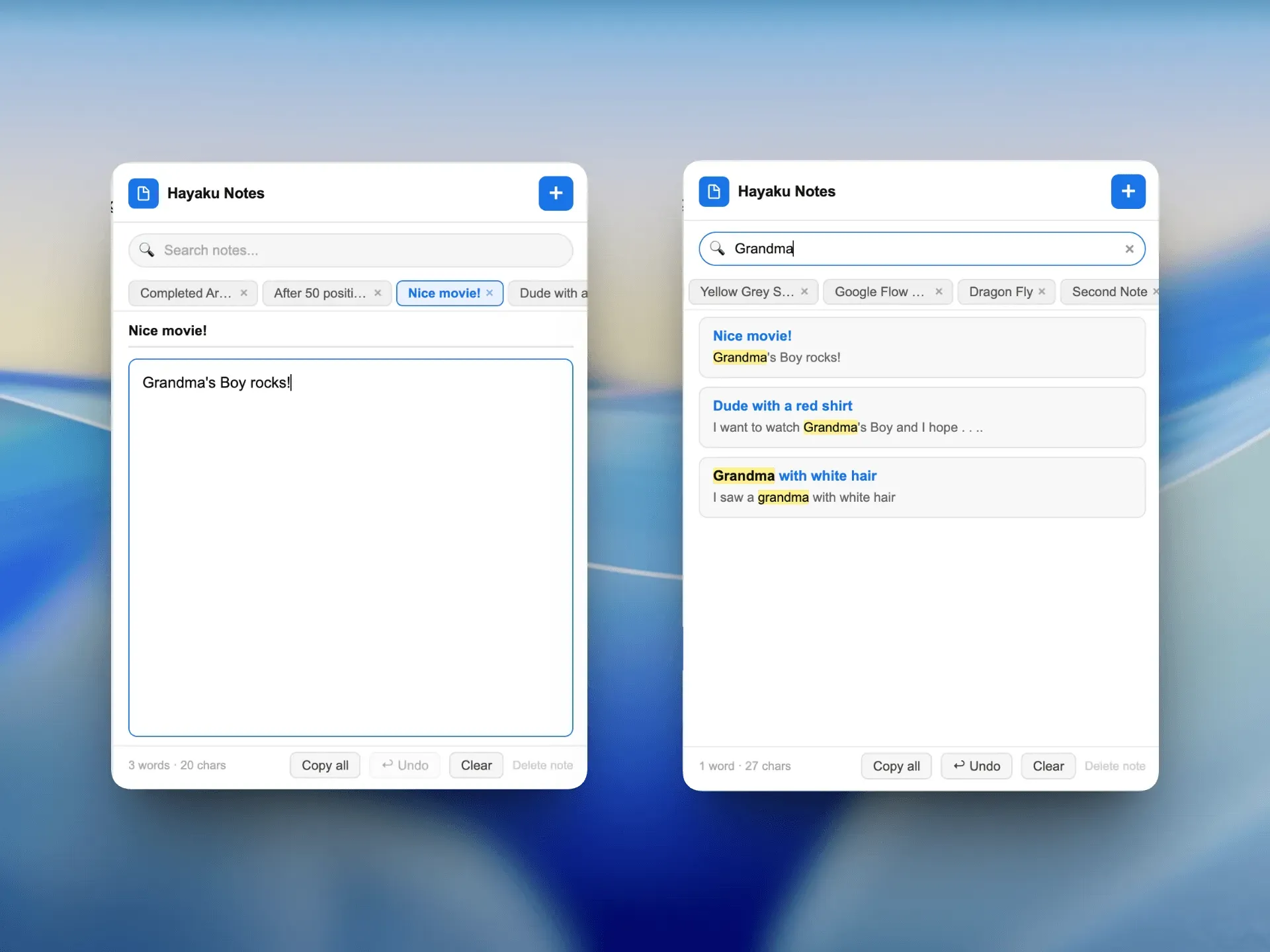
Hayaku Notes: Rapid Thought Capture Hayaku Notes is described as the fastest thought capture tool for the browser. With one click, users can jot down an idea and move on. The extension prioritizes speed and simplicity, avoiding the clutter of full note-taking apps. It’s built for moments when a thought strikes mid-task, allowing capture without breaking workflow. The name "Hayaku" means "quick" in Japanese, reinforcing the product’s core value proposition.
No Subscription Model Both tools are offered without any recurring fees. This is a standout differentiator in a market where many productivity apps charge monthly or yearly subscriptions. Akita Apps explicitly states "no subscriptions" on its homepage, making the value proposition clear for cost-conscious users.
Minimalist Design Language The entire Akita website and presumably the extensions use a minimalist design with clean typography, generous whitespace, and a restrained color palette. This design philosophy extends to the products themselves, which aim to have zero learning curve and zero UI clutter.
Single-Page Landing with Direct Call to Action The homepage is a single-section landing that immediately presents the two tools with descriptive copy and clear "Learn more" links. There is no navigation maze; users can quickly understand the offering and click through to the tool they need. This simplicity mirrors the product ethos.
Focus on Browser Integration Both tools are Chrome extensions, meaning they integrate directly into the browser’s toolbar. This gives them constant visibility and quick access without tab-switching or opening separate windows. The browser extension format is ideal for the use cases they address: blocking sites and capturing notes while browsing.
No Account Required for Basic Use While not explicitly stated, the free and simple nature of the tools suggests no mandatory account creation for basic functionality. This removes friction and aligns with the philosophy of getting out of the user’s way.
How It Works
The user journey for Akita Apps begins on the homepage, where the two tools are prominently displayed with icons and brief descriptions. Clicking "Learn more" on either tile takes the user to a dedicated product page (though these pages were not scraped, the navigation suggests they exist at /dopamine-destroyer and /hayakunotes).
For Dopamine Destroyer, the typical workflow involves installing the Chrome extension from the Chrome Web Store (link not provided but inferred). Once installed, the extension adds a toolbar icon. When the user needs to focus, they click the icon to toggle the block on. Distracting websites specified in the settings are immediately inaccessible. To turn off the block, the user clicks again. There are no schedules, no pomodoro timers, no analytics — just an on/off switch.
For Hayaku Notes, the user also installs a Chrome extension. Clicking the toolbar icon opens a small input box where the user types a note and presses enter or clicks save. The note is stored locally or synced via browser storage. The tool is designed for speed: one click to open, one click to save. There is no folder management or formatting — just raw capture.
Both extensions require no signup or login, reducing the barrier to entry. The setup process is likely a 30-second install from the Chrome Web Store. Akita’s design decisions emphasize zero configuration and immediate utility.
Use Cases
A student distracted by social media during study sessions A college student preparing for exams often finds themselves scrolling through Twitter or Instagram instead of studying. With Dopamine Destroyer, they can toggle the block at the start of each study session. The one-switch simplicity means they don’t waste time configuring complicated rules; they just turn it on and focus. After the session, they turn it off. No guilt, no analytics, no friction.
A remote worker needing quick idea capture during meetings During a Zoom call, a team member suddenly thinks of a task or idea they need to remember later. Instead of opening a note-taking app that takes 30 seconds to load, they click Hayaku Notes in the browser toolbar, type a few words, and return to the meeting. The thought is saved before it slips away, and the minimal interface doesn’t distract them from the conversation.
A freelancer juggling multiple projects A freelancer often switches between different clients and needs to block time-wasting sites while working on billable tasks. Dopamine Destroyer’s instant toggle lets them start a focus block at the beginning of a work sprint. The lack of scheduling means they can adapt to their daily rhythm without extra planning.
A writer avoiding research rabbit holes A writer researching an article might start reading a related article, then click another link, and quickly lose track of time. Dopamine Destroyer can block sites that aren’t directly relevant to the writing task. The writer turns on the block before starting to write, ensuring that research stays focused.
A developer capturing code ideas without leaving the IDE While coding, a developer has a sudden insight about a different part of the project. They use Hayaku Notes to quickly jot down the idea and then return to coding. The extension stays in the browser, accessible without switching windows. The developer can later review and organize these notes.
Pricing & Value
Akita Apps explicitly states "No subscriptions" on its homepage. Both Dopamine Destroyer and Hayaku Notes are free to use, with no tiered pricing visible on the website. This makes the value proposition exceptionally clear: users get functional, focused tools without paying anything. The company’s revenue model is not discussed on the homepage; it may rely on donations, future premium features, or other undisclosed methods. For now, the tools are free, which is a strong advantage compared to competitors like Freedom ($6.99/month) or Cold Turkey ($39 one-time). However, the lack of a paid plan also raises questions about long-term sustainability and future development. Users who need advanced features like scheduling, whitelisting specific sites, or syncing across devices may find the free versions too limited for deeper needs.
Final Verdict
Akita Apps delivers exactly what it promises: simple, no-cost browser tools for focus and note-taking. The strength lies in its radical simplicity — no subscriptions, no feature creep, no guilt. The two tools address common productivity pain points with elegance. However, the limited feature set and lack of advanced options may frustrate power users. The absence of a clear business model is also a concern; will the tools remain free forever? For now, anyone looking for a lightweight, distraction-free experience should try Dopamine Destroyer or explore Hayaku Notes. The site’s homepage itself is a model of minimalism. This is a solid choice for users who value simplicity over power, but not for those needing customizable blocking or rich note-taking features.