
Overview
VoicemailSaver.com addresses a problem most phone owners notice only after the damage is done: carrier voicemail boxes are temporary storage and handset memory is finite. Once a message is purged from a network server or a device is wiped, the recording is gone. The service, marketed as Voicemail Saver & Text Backup, is a consumer utility that copies voicemails, text messages, contacts, photos, videos, audio files and documents off a phone and into a cloud repository, where the material can be retrieved later from another device. It is published by Sound Feelings Publishing, a company that traces the product line back to 2001 and positions itself as an early specialist in voicemail archiving, a claim that carries some weight given how few dedicated competitors remain in this niche.
The positioning is deliberately unglamorous. This is not a collaboration suite or an AI assistant. It is archival plumbing for personal and small business communication. The competitive set is effectively three options: carrier visual voicemail with short retention windows, full device backups through iCloud or Google One that capture everything but make single message retrieval awkward, and general purpose cloud drives that demand manual file handling. The argument here is focus. The tool does one job, keeps the workflow to a few taps, and stores results in a location independent of both the carrier and the handset.
Target users are individuals holding sentimental or evidentiary recordings, sole proprietors who take orders by phone, and anyone who regularly hits a full voicemail inbox. The app ships for iOS through the App Store and for Android through Google Play, with a browser portal for account access at app.voicemailsaver.com.
Key Features
Unified multi format capture. The app is not limited to voice messages. It pulls voicemails, texts, contacts, photos, videos, audio recordings and documents into a single backup flow. For households or small businesses that treat a phone as the primary record keeper, that breadth removes the need to juggle several tools inside one archiving routine.
Cloud repository with cross device retrieval. Files land in a secure cloud location rather than on a local drive or memory card. From that repository they can be downloaded to any other device for safekeeping. The practical effect is device independence: changing handsets or switching platforms no longer severs access to years of accumulated messages.
Cable free, PIN free transfers. The marketing makes a point of the absence of USB cables and carrier voicemail PIN codes. That is a meaningful user experience decision. Traditional voicemail export often involves dialing into a mailbox, entering a passcode, and capturing playback through a third party recorder. The app instead performs the transfer inside the phone, which lowers the failure rate for non technical users considerably.
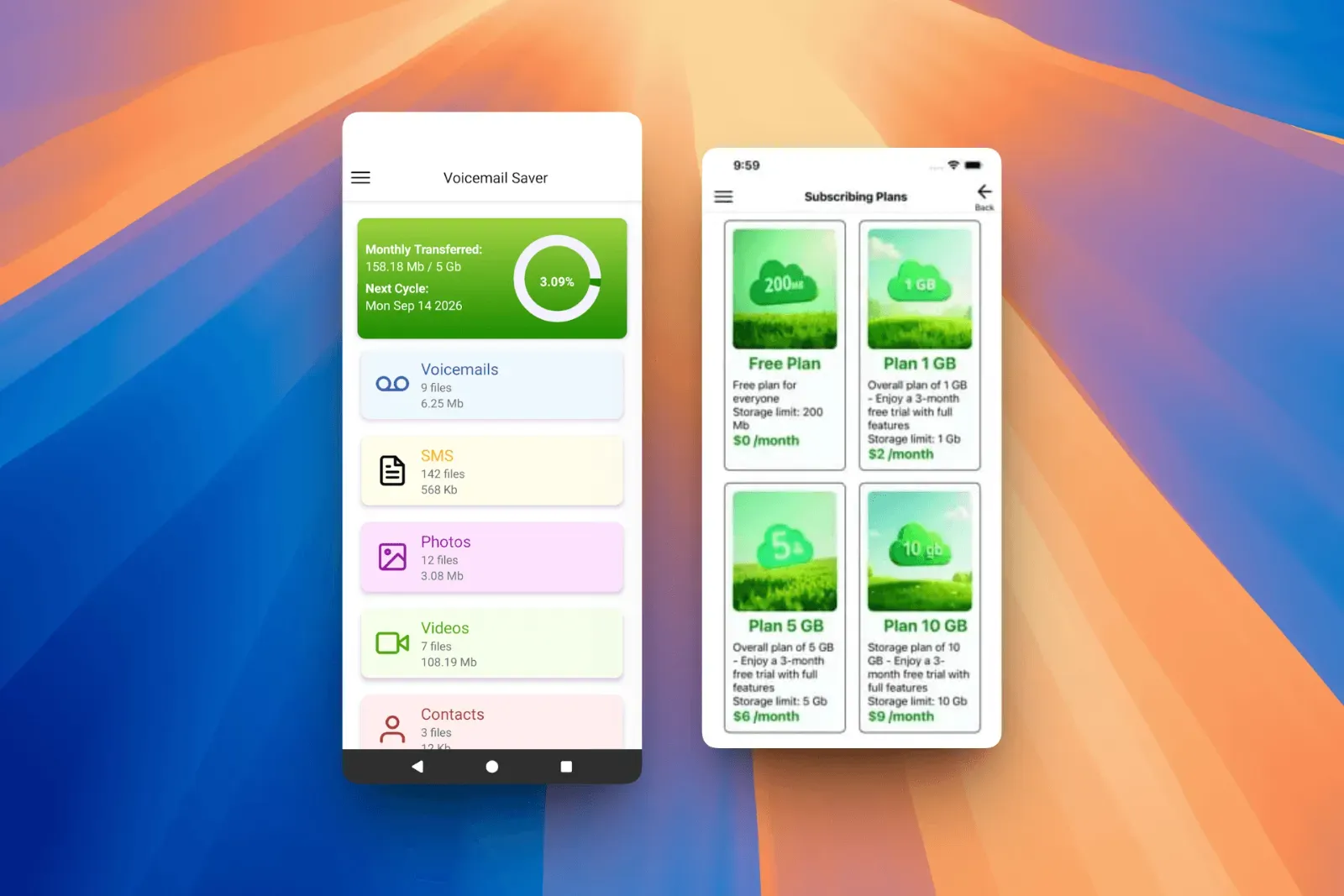
Tiered capacity reaching 10GB. Storage is sold in usage based tiers, with the top plan set at 10GB. The tiering model suits the underlying content: a few hundred voicemail clips consume far less space than a library of videos, so users with archive heavy workloads are not forced to subsidise light users.
Permanent free entry level. The lowest tier is described as free for all customers and is stated to remain free indefinitely. That gives the product a genuine trial path rather than a countdown, and it makes casual archiving viable without a subscription commitment.
Web based account portal. A separate login at app.voicemailsaver.com provides dashboard access for anyone who has already created an account through the mobile app. The portal is where downloads to a computer are managed, which matters for users who want a second copy on a desktop rather than only another phone.
Published policy set and affiliate programme. The site documents app terms and conditions, a dedicated app privacy policy, and an affiliate programme with its own page. Publishing a standalone privacy policy for the mobile client, separate from the corporate site, is the kind of detail that suggests the cloud storage and account handling were treated as a distinct compliance surface.
Storage relief after confirmation. The recommended workflow asks users to verify that files are safely backed up before deleting them from the handset. That sequencing is a small but sensible safeguard, and it turns the app into a tool for reclaiming phone storage rather than purely a hoarding exercise.
How It Works
The journey starts in an app store. Users search for Voicemail Saver & Text Backup, and the site is explicit about a naming hazard: an unrelated product called Voicemail Saver exists, and the visual identity of the correct app is shown on the page so it can be matched before installation. Getting past that first step is the only real friction point in onboarding.
After installation, an account is created inside the app. From there the user selects which content categories to move: voicemails, texts, contacts, media or documents. Transfers run over the phone's own connection with no cable and no carrier passcode, which removes the two steps where most manual export attempts fail. Files are pushed to the secure cloud location associated with the account.
Confirmation comes next. The product instructs users to wait until the backup is verified before deleting anything from the device. That ordering is the difference between an archive and an accidental erasure, and it is stated plainly in the product copy rather than buried in documentation.
Daily use is light. There is no dashboard to check, no sync client to keep running, and no integrations to configure. Subscribers return to the app when they want to move a new batch, and they return to the browser portal when they want to pull files down to another machine. The workflow for anyone interested in the voice specific side of the product is documented on the iPhone voicemail backup service page, while the messaging side is covered under the mobile phone text backup service. Handling of stored files and account data is described in the app privacy policy.
Use Cases
Preserving a family member's voice. A common scenario for this class of tool is the death of a relative who left recorded messages. Carrier systems age out recordings on a fixed schedule, often without warning to the account holder. Copying audio to a cloud archive makes the recording independent of a phone number that may be cancelled during estate administration.
Sole proprietors taking orders by phone. A contractor, caterer or repair service that receives job details by voicemail is effectively running an unstructured order book. Backing up those messages creates a retrievable record of what was requested and when, which is useful when a dispute arises months later.
Inbox overflow on a fixed storage plan. Phone voicemail quotas are small, often a couple of dozen messages. A user who travels or works in the field can hit the limit and silently stop receiving new messages. Offloading older audio to the cloud clears capacity without losing the content.
Device migration after a carrier change. Moving between platforms, or between carriers with different visual voicemail implementations, frequently strands older messages. An independent archive preserves the history regardless of which network or operating system comes next.
Media and document consolidation. Because the app also handles photos, videos and documents, it can serve as a lightweight catch all for someone who wants a single copy of phone resident files outside the platform vendor's ecosystem, without adopting a full sync service.
Pricing & Value
The pricing model is tiered by storage volume, with the ceiling set at 10GB. The basic tier is free for all customers and is described as permanently free, which sets a low bar for trying the product. Above that, advanced service is billed monthly depending on usage. The site does not publish specific dollar amounts per tier on this page, instead presenting the structure through a promotional graphic.
The notable commercial detail is a launch promotion: every tier is free for three months, available until 15 February 2027, offered in exchange for feedback from real users. The company explicitly asks subscribers to start at the 10GB tier during the trial so that file transfers are never blocked, then downgrade afterwards. That is unusually candid guidance, and it converts the trial into a capacity test rather than a limited demo.
Value depends heavily on volume. For a user archiving a handful of voicemails per month, the free tier covers the need and the paid plans are irrelevant. For someone consolidating years of media, the 10GB ceiling is modest compared with general cloud drives, but the pricing reflects a specialised transfer workflow rather than raw storage, and that is the honest basis for comparison.
Final Verdict
VoicemailSaver occupies a narrow lane and occupies it competently. The strengths are practical: seven content types in one backup flow, cloud storage that survives a device change, a transfer process that avoids cables and carrier PINs, a permanently free entry tier, and an operating history stretching back to 2001 with a published privacy policy behind the mobile client. The three month, all tier promotion further lowers the cost of evaluating whether the workflow fits a given archive.
The weaknesses are equally clear. Pricing is presented as an image rather than itemised numbers, so budgeting requires a visit to the app store listing or direct contact. The 10GB ceiling is small for anyone treating the service as a general media vault. And the product is intentionally isolated: there is no API, no desktop application, and no integration layer, which limits its appeal to teams that need programmatic export.
The tool suits individuals, families and micro businesses with irreplaceable voice messages or an overflowing inbox, particularly those who want a set and forget archive rather than a sync platform. Buyers looking for enterprise grade retention policy, searchable transcripts or large capacity storage should look at full device backup services instead. For the specific job of rescuing voicemails before a carrier deletes them, this remains a straightforward and reasonably priced option.