
Overview
Light Cloud is a deployment platform that bridges the gap between a simple static host and a full infrastructure manager. It connects directly to GitHub repositories and turns every push into a live URL, eliminating the need for manual builds and SSH commands. The platform targets developers, startups, and small teams that want a fast iteration loop without sacrificing backend needs like databases or containerized services. Unlike Vercel or Netlify, which primarily handle frontend projects, Light Cloud adds managed Postgres and Cloud Run-based containers to the same workflow. This makes it a plausible choice for full-stack applications that need a single environment for all components. The product also leans into AI-assisted deployment, offering an MCP server for Claude and a VS Code extension for GitHub Copilot, which sets it apart in a crowded hosting market.
Key Features
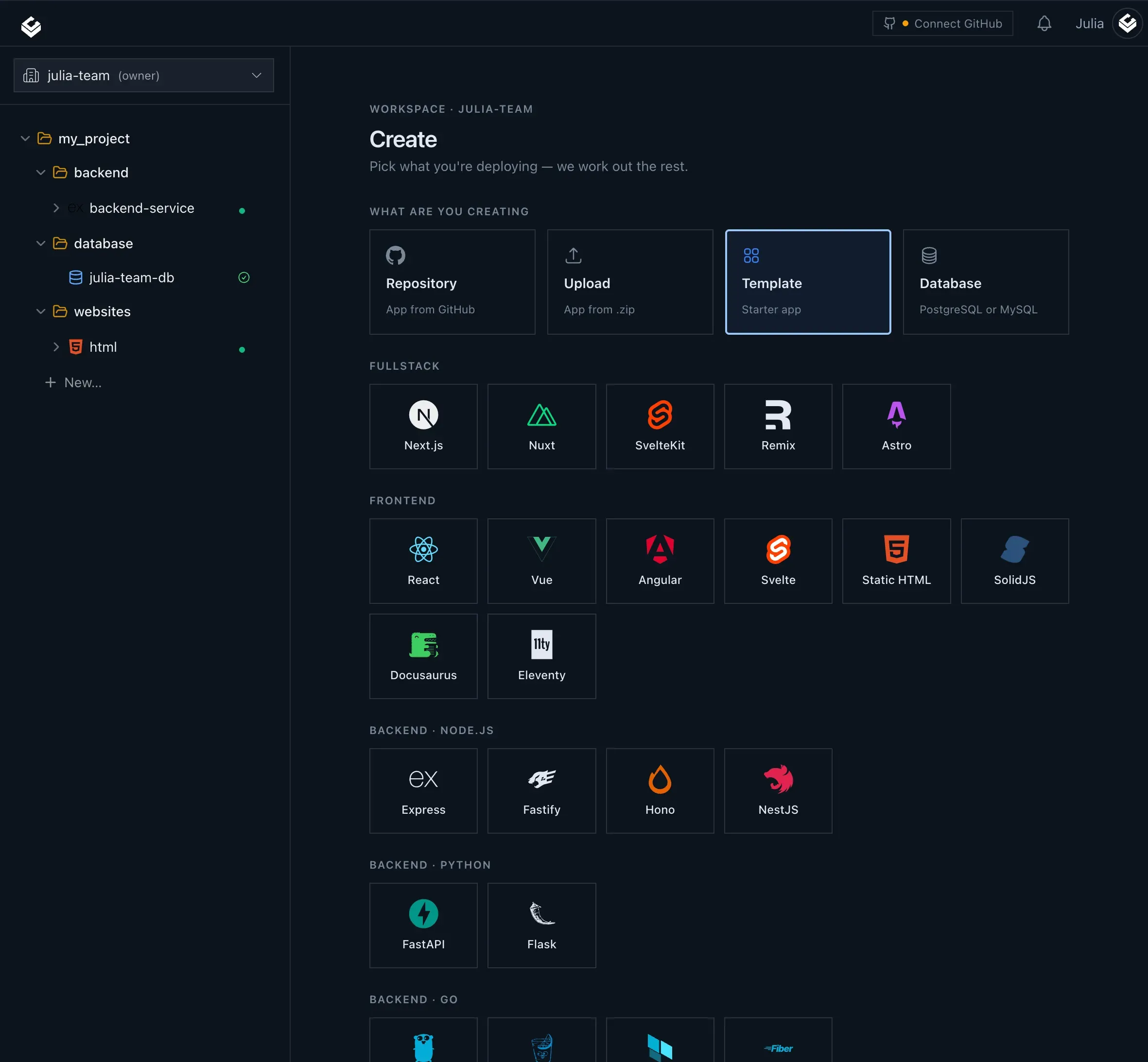
Full-Stack Hosting: Light Cloud handles both static sites and containerized services. Static assets are distributed through a global CDN, while containers run on Google Cloud Run. The platform reads the repository structure and automatically chooses the appropriate deployment target, reducing configuration overhead for developers.
Managed Postgres: The platform allows users to provision a managed Postgres database from the same project. Users select a tier, region, and storage size. Database credentials are encrypted and automatically wired into the app environment, removing the friction of external database setup.
Branch Previews: Every branch and pull request receives its own unique preview URL. These environments are built on each push and automatically removed when the branch is deleted. This is a developer-friendly feature that makes code review more practical, especially for UI changes.
Scale to Zero: Container deployments on Cloud Run stop when they are idle. This means users only pay for actual runtime, which can significantly reduce costs for applications with sporadic traffic. The preview environments also benefit from this, as they cost nothing when not actively used.
AI-Powered Deployment: The Light Cloud MCP server lets Claude create apps, trigger deploys, and read logs from a conversational interface. The VS Code extension adds an @lightcloud integration to GitHub Copilot, enabling slash commands like /deploy, /status, and /plan. Framework detection and .env parsing are handled automatically, which simplifies the AI deployment flow.
Integrated Observability: Build logs, runtime logs, and metrics are displayed in the console alongside the environment they belong to. Users can watch a build stream in real time and follow the service after it goes live, without needing to jump to a separate monitoring tool.
GitHub-Native Workflow: The entire platform is centered around GitHub. Deployment metadata includes the commit, author, build time, and logs for every build. This creates a clear audit trail and integrates naturally with existing development processes.
How It Works
The first step is connecting a GitHub repository. After signing up, users authorize Light Cloud to access their repos. The platform then analyzes the repository to deduce whether it is a static site or a containerized app. For a static frontend, it detects the build process and output directory. For a backend, it looks for a Dockerfile or a recognized runtime. On the next push, Light Cloud automatically builds the commit and deploys it to either the CDN or Cloud Run. The console shows a stream of build logs, and as soon as the deploy is complete, a live URL is generated.
For a branch preview, the user simply creates a branch or opens a pull request. Light Cloud builds that branch and assigns a unique preview URL. The preview remains active until the branch is deleted. If a database is needed, the user provisions a managed Postgres instance from the dashboard. Credentials are injected into the app environment, so no additional configuration is required.
The AI tools work in parallel. In Claude, the user can invoke the MCP server to perform deployments. In VS Code, the Copilot extension allows the developer to type /deploy in a chat and see the deployment status. The whole workflow is designed to keep the developer focused on code rather than infrastructure.
The user experience is heavily oriented toward automation. There is no need to write YAML deployment files or configure environments manually. The platform's own selection logic handles the heavy lifting, which is a major convenience but also means less fine-grained control compared to tools like AWS Amplify or Google Cloud Run directly.
Use Cases
Solo developers building a SaaS prototype: An independent developer can connect a monorepo with a React frontend and a Node backend. Light Cloud deploys both to the same project, provisions a Postgres database, and gives a URL to share with beta testers.
Startup teams needing per-feature previews: A team of five engineers working on a web app can use branch previews to test each pull request in isolation. This prevents breaking changes from reaching production and gives product managers a concrete way to review new features before merging.
Agencies managing multiple client sites: A web agency can use Light Cloud to deploy static marketing sites or containerized client apps. The scale-to-zero model keeps costs low when client traffic is minimal, and the simple GitHub integration makes handoff to clients straightforward.
Development teams adopting AI coding assistants: A team using GitHub Copilot can leverage the VS Code extension to deploy without switching contexts. The /plan slash command can help outline deployment steps before committing, making the workflow more conversational.
Full-stack projects that need a database without manual ops: Teams that want Postgres but don't want to manage backups, replication, or scaling will benefit from the managed database. The automatic wiring of credentials saves time and reduces errors.
Pricing & Value
Light Cloud does not list detailed pricing on the homepage, but it directs users to a dedicated pricing page. The site mentions a "Free plan" and encourages starting on it, which suggests a freemium model. Based on the platform's infrastructure (CDN, Cloud Run, managed Postgres), it is likely to offer tiered plans based on usage, container scaling, and database size. The cost structure likely aligns with similar platforms like Vercel or Netlify, but the inclusion of a managed database may offer better value for full-stack apps compared to paying for separate services. However, the reliance on Cloud Run means that high traffic could incur higher costs compared to a flat-rate PaaS. Teams should evaluate the pricing calculator against their expected usage.
Final Verdict
Light Cloud presents a compelling layer of abstraction over modern cloud infrastructure. It simplifies full-stack deployments by combining static hosting, containers, and Postgres into a GitHub-centric workflow. The AI integrations are a forward-looking addition that could appeal to teams experimenting with agent-driven development. The automatic preview environments and scale-to-zero pricing are practical benefits that reduce both mental overhead and cost.
That said, the platform is not without trade-offs. It requires GitHub as the source of truth, which excludes teams using GitLab or Bitbucket. The strong dependence on Cloud Run means that some advanced container configuration options are not exposed, as the platform manages those details. As a newer entrant, its ecosystem and community are still growing, and users may find fewer third-party tutorials and tools compared to established hosts.
Developers who value speed, simplicity, and a full-stack package should give Light Cloud a try. Those who need advanced edge functions, fine-grained infrastructure control, or private cloud support might need to look elsewhere. The platform's documentation offers a deeper look, and the Labs section shows where the company is headed with tools like ICE. All in all, Light Cloud is a promising option for teams that want to ship fast without leaving their GitHub flow.