
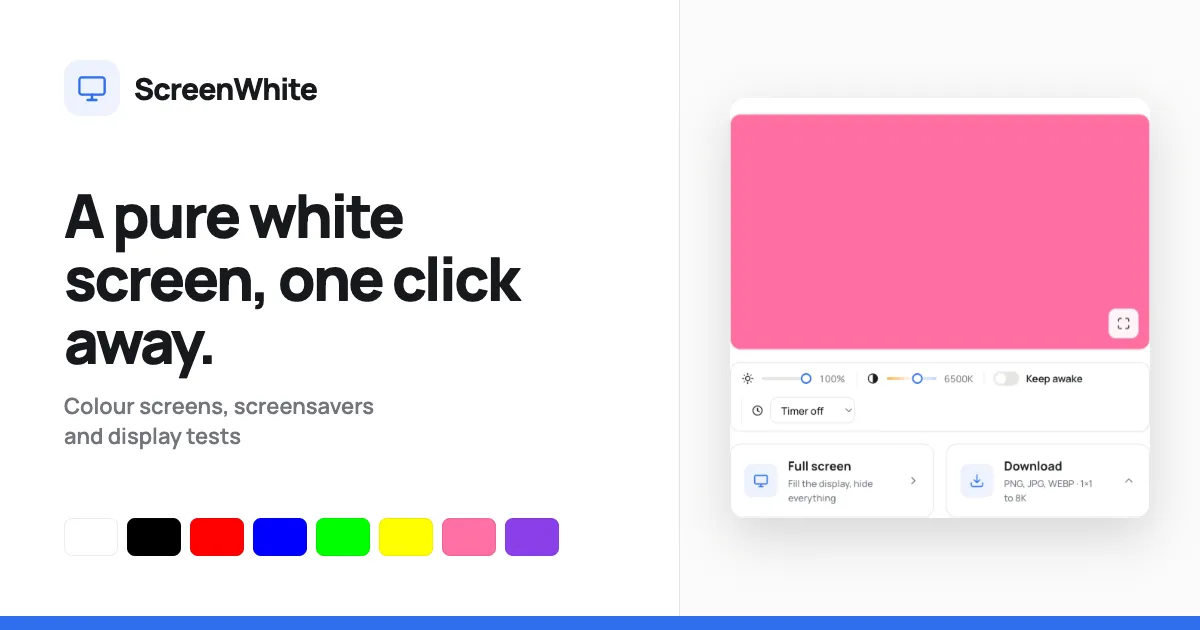
ScreenWhite is a lightweight web utility that converts a browser tab into a full-screen white background. Designed for professionals, creators, and everyday users, it serves as an instant light source for video calls, a light table for tracing, and a diagnostic aid for display inspection. The service also provides other solid colour screens, screensavers, and test tools through a unified interface.
Overview
ScreenWhite is a free, browser-based tool that instantly turns a display into a pure white screen. It targets anyone who needs a reliable solid-colour backdrop for tasks like lighting a video call, testing for dead pixels, or tracing artwork. The tool is accessible directly from the website, requires no sign-up, and extends beyond white to include black, red, green, and other colours.
Key Features
Instant full-screen display: The page uses an inline style to paint the white colour before any CSS or JavaScript loads, ensuring the screen is filled immediately without a visible flash. Pressing "Full screen" hides all interface elements until the user exits with Escape.
Brightness and warmth sliders: Two range controls let users adjust luminance from 10% to 100% and colour temperature from 2000K to 9000K. Values update in real time, and the actual RGB colour is recalculated rather than applying a filter over the page.
Screen wake lock: An optional "Keep awake" toggle uses the browser's Screen Wake Lock API to request the operating system keep the display on. The lock is released automatically when the user leaves the page or hides the tab.
Timer support: A dropdown selector offers countdowns from one minute to one hour, allowing the screen to be set with a planned end time.
Downloadable white images: The download panel generates PNG, JPG, or WEBP files in common resolutions such as HD, 4K, 5K, 8K, mobile, square, or even a single pixel. PNG files are written server-side as one-bit palette images, yielding files of only a few kilobytes even at 8K.
Direct links and embedding: Static URLs for white images (e.g., /image/white-1920x1080.png) work without opening the page, and an iframe snippet allows the screen to be embedded on other websites.
Use Cases
- Video call fill light: Content creators and remote workers can position a tablet near their face to produce soft, even lighting. The colour temperature slider helps match indoor lighting.
- Display testing and cleaning: Repair technicians and quality control staff use a solid white field to spot dead pixels, dust, or uniformity issues on monitors and phones. The site includes dedicated dead pixel and uniformity test tools.
- Tracing and drawing aid: Artists place paper over the screen to trace line art or backlight transparencies. A simple white 1x1 image download can be used to calibrate colour settings.
Differentiators
ScreenWhite distinguishes itself through technical optimization and transparency. The pixel-perfect first paint avoids the common dark flash found in many fullscreen utilities. The page weighs roughly 6 KB with no frameworks or databases, making it exceptionally fast on low-end hardware. Its direct image URLs and embeddable screen are unusual among colour screen websites, which typically require users to stay on the page. Most competing tools either lack adjustable warmth or push users toward proprietary apps; ScreenWhite keeps everything client-side and free.