
Overview
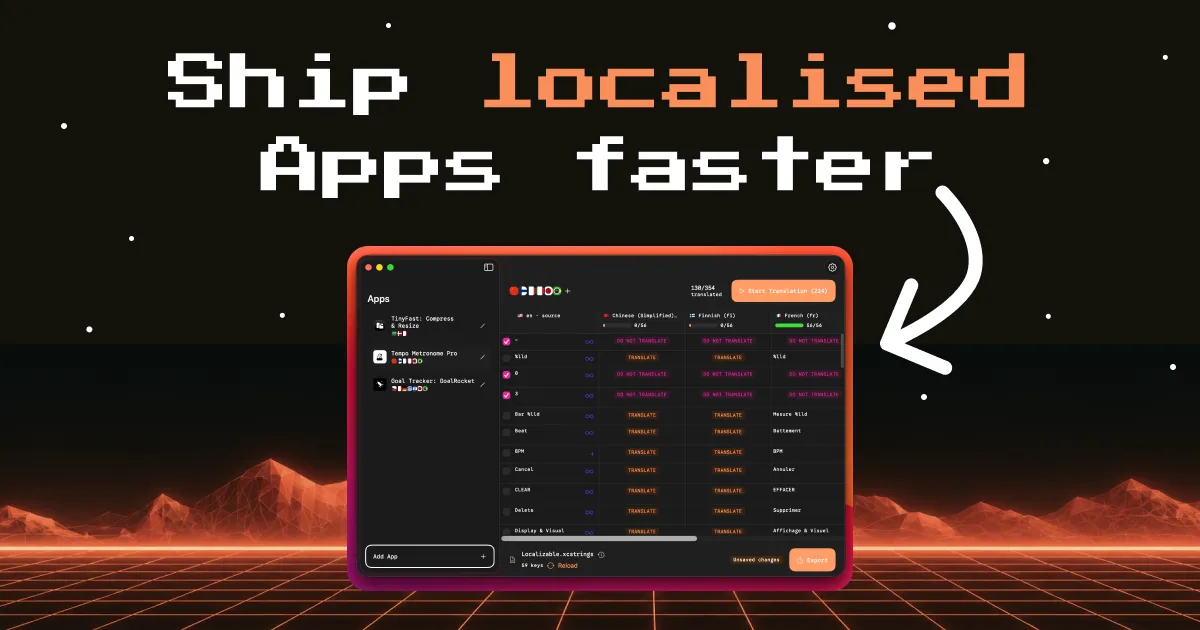
AppUFO is a macOS-native application designed to streamline the localization process for iOS developers. It translates Apple's .xcstrings string catalog files into over 36 languages using artificial intelligence, aiming to reduce the time and cost typically associated with app localization. The tool is built for indie developers and small teams who need to expand their app's reach into international markets without relying on expensive translation services or complex workflows. Unlike traditional localization methods that require manual string management or third-party translation platforms, AppUFO integrates directly with Xcode's development workflow, enabling a drag-and-drop translation experience that preserves placeholders, string tokens, and UI constraints.
The market for app localization tools is fragmented, with options ranging from basic CSV editors to enterprise-grade platforms like Lokalise or Crowdin. AppUFO positions itself as a lightweight, AI-first alternative that prioritizes speed and developer convenience. The app's emphasis on preserving string context and avoiding UI-breaking translations addresses a common pain point in automated translations. By focusing exclusively on .xcstrings files (the modern string catalog format introduced in Xcode 15), AppUFO targets developers who have adopted Apple's latest localization standard. The product is developed by Melvin, an iOS developer with over a decade of experience, which lends credibility to its understanding of real-world localization challenges.
Key Features
AI-Powered Translation – AppUFO leverages AI models to translate strings while maintaining awareness of the app's context. Unlike generic translation tools, it can handle placeholders like %@ and %d, ensuring that translated strings retain correct formatting for variables. Users can bring their own AI API keys for increased privacy and control, or use the built-in AI credits included in subscription plans.
Drag-and-Drop Workflow – The core interaction is simple: users drag an .xcstrings file directly into the AppUFO window. The app instantly parses the catalog, detects source language, and presents a clean interface for selecting target languages. This eliminates the need to export/import CSV files or navigate complex menus. Videos on the landing page demonstrate the entire process taking just seconds.
Character Limit Enforcement – One of the most valuable features for UI integrity is the ability to set maximum character lengths per translation. Developers can define limits for each string, and AppUFO will flag or adjust translations that exceed the constraint. This prevents common localization issues where translated text overflows buttons or labels.
Reverse Translation Check – For languages the developer doesn't speak (e.g., Chinese, Arabic, Japanese), AppUFO offers a reverse translation feature that uses Apple's built-in translation framework to convert the translated string back to the source language. This provides a quick sanity check without requiring a human reviewer.
Glossary and Brand Protection – Users can maintain a glossary of terms that must remain untranslated, such as brand names or product names. The app ensures these words are preserved exactly across all target languages, maintaining brand consistency.
Unlimited Apps and Languages – All paid plans allow unlimited app projects and language pairs. There is no per-project limitation, making it suitable for developers managing multiple apps or frequent updates. The app supports all languages available in iOS, including right-to-left languages like Arabic and Hebrew.
Export Integration with Xcode – After translation, AppUFO exports the .xcstrings file in its original format, ready to be dropped back into Xcode. The process does not alter the file structure or add unnecessary metadata, ensuring seamless integration with version control systems like Git.
How It Works
Getting started with AppUFO requires no account creation or complex setup. The app is downloaded from the Mac App Store and launched directly. Upon opening, the user is greeted by a minimal interface with a large drop zone. The workflow consists of three primary steps:
-
Drag and Drop: The user locates their .xcstrings file in Finder and drags it onto the AppUFO window. The app automatically detects the source language (usually English) and lists all available string keys with their source translations.
-
Select Target Languages: From a dropdown menu, the user chooses which languages to translate into. All 36+ languages supported by iOS are available, including regional variants like en-GB and pt-BR. The app displays the total number of phrases to be translated, along with an estimated AI credit cost.
-
Translate and Export: Clicking the "Translate" button initiates the AI translation process. Progress is shown per language, and each translated string can be individually reviewed or re-translated if needed. Once complete, the user clicks "Export" to save the fully localized .xcstrings file. The file can then be added to the Xcode project just like any other string catalog.
Throughout the process, AppUFO provides transparency into AI usage. The built-in AI plan includes 25,000 phrases per month (monthly subscription) or 250,000 per year (yearly subscription). For the lifetime plan, users must provide their own OpenAI API key, which grants unlimited translations but charges at the user's own API rate. The app also offers optional settings like character limits, glossary terms, and reverse translation for verification.
Use Cases
Indie iOS Developer Launching Globally – An independent developer has built a popular to-do list app in English but wants to reach German, French, and Japanese audiences. Using AppUFO, they can translate their entire .xcstrings file into three languages in under five minutes, ensuring placeholder strings remain intact and button labels fit within UI constraints. The reverse translation feature helps verify Japanese translations without knowing the language.
Small Studio with Multiple Apps – A small development studio maintains five iOS apps across different niches. With AppUFO's unlimited app policy, they can translate all apps in a single subscription, maintaining a consistent glossary of brand terms across products. The character limit feature prevents UI overflow in apps with tight layouts.
Developer Localizing an Existing App Update – An app receives a major update with 50 new strings. Instead of sending the entire file to a translation agency, the developer drops the updated .xcstrings into AppUFO, selects only the new strings (by detecting unchanged vs. new keys), and translates them in bulk. The existing translations are preserved, saving time and avoiding repeated costs.
Agency Handling Client Localization – A mobile development agency needs to localize a client's app into Arabic and Chinese. The agency uses AppUFO to handle the initial AI translation, then has a bilingual team member manually review and adjust using the in-app editing interface. The character limit constraint ensures the final output fits the client's design specifications.
Hobbyist with Open-Source App – An open-source iOS app maintainer wants to make the project accessible to non-English speakers. Using AppUFO, they can quickly generate translations for community contributions, then invite volunteers to refine specific strings via GitHub pull requests. The glossary feature ensures project-specific terminology stays consistent.
Pricing & Value
AppUFO offers three pricing tiers, all available through the Mac App Store as in-app purchases:
-
Monthly Plan (€9.99/month): Includes AI translations with no API key required, 25,000 AI phrase credits per month, unlimited apps and languages, glossary, reverse translate, and character limits. Ideal for developers who need occasional localization or are testing the tool.
-
Yearly Plan (€69.99/year): Same features as monthly but with 250,000 AI phrase credits per year (effectively ~20,833 per month). This represents roughly a 42% savings over the monthly rate and suits developers with frequent updates.
-
Lifetime Plan (€39.99): A one-time purchase that requires the user to bring their own OpenAI API key. All features are included with no cap on translations (beyond the user's own API usage). This option maximizes privacy as no data passes through AppUFO servers.
Compared to services like Lokalise (starting at $120/month for team plans) or manual translation agencies ($0.10–$0.30 per word), AppUFO is significantly cheaper for small volumes. However, the AI-generated translations may not match the quality of professional human review, especially for context-heavy or creative copy. The lifetime plan is a particularly good deal for developers who already have an OpenAI API key and want unlimited use.
Final Verdict
AppUFO successfully addresses a specific pain point for iOS developers: fast, AI-powered localization of .xcstrings files. Its strength lies in its laser focus on the Xcode workflow, drag-and-drop simplicity, and features like character limits and reverse translation that protect UI integrity. The pricing is competitive for indie developers, and the lifetime BYO key option offers excellent value for privacy-conscious users.
However, the tool has limitations. It only supports Apple's .xcstrings format (not older .strings files or Android resources). The AI translation quality, while adequate for most UI strings, may struggle with idioms or marketing copy that requires creative adaptation. There is no collaboration feature for teams, and no version history or cloud sync. Developers who need professional-grade localization with human review or multi-platform support should look elsewhere.
Overall, AppUFO is a well-executed niche tool ideal for solo developers and small teams who prioritize speed and cost savings over absolute translation perfection. For anyone shipping an iOS app to global markets, check out the tool on the Mac App Store or visit the official website to learn more. The privacy policy details how data is handled, and the help page offers troubleshooting guidance.