
Overview
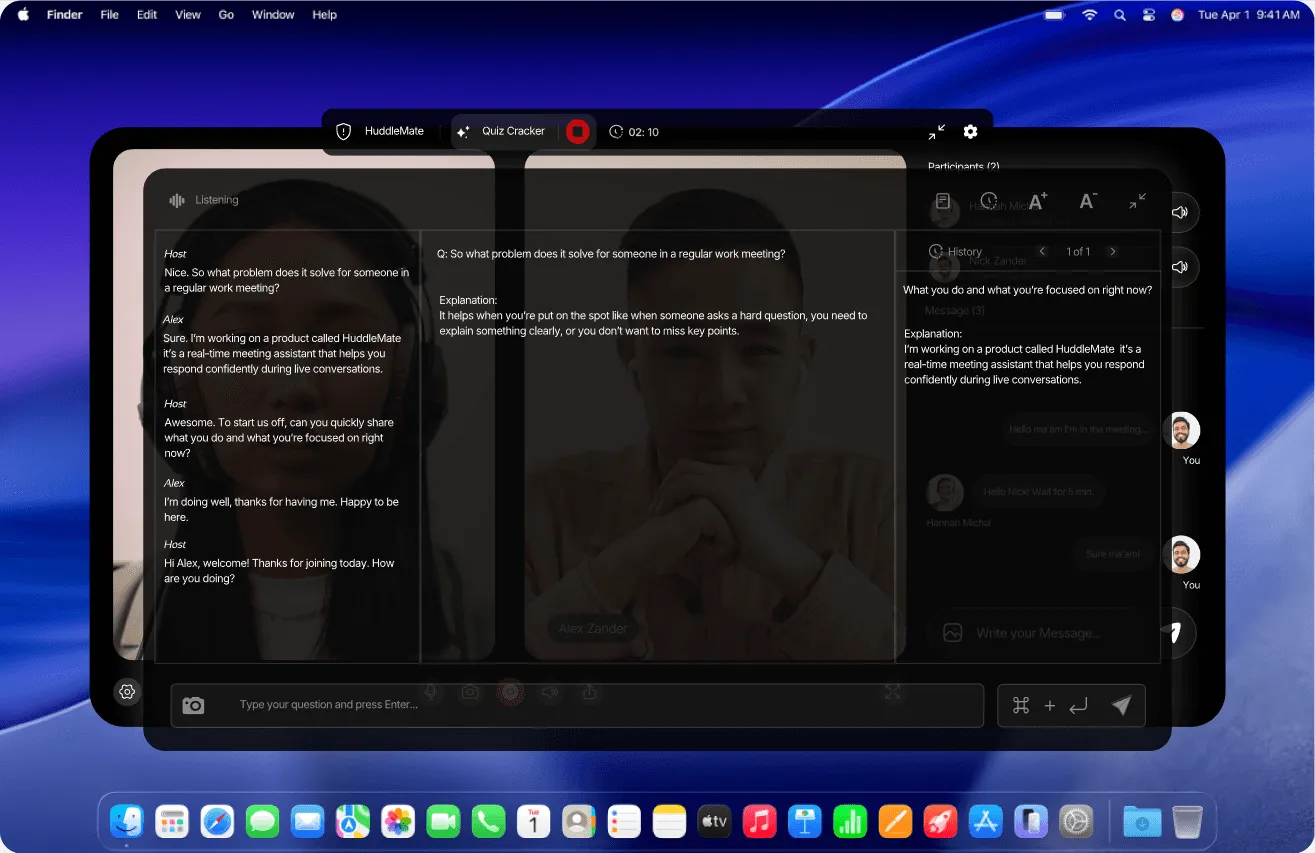
HuddleMate is a real-time AI meeting assistant distributed by the team behind huddlemate.ai. The product listens to live conversation, observes the user's screen, and produces suggested responses on demand, positioning itself as a quiet copilot rather than a visible meeting bot. The core promise is concrete: instead of freezing when an unexpected question arrives during a job interview, a sales call, or a team meeting, the user receives a structured answer within seconds.
The problem it addresses is familiar. Candidates blank on unrehearsed questions, salespeople lose momentum when objections surface, and meeting participants scramble for numbers buried in documents. General-purpose chatbots require manual prompting and constant context switching, which is impractical while a conversation is moving. HuddleMate attempts to close that gap by staying resident on the device, transcribing audio continuously, and offering context-aware output without the user typing a single word.
The target audience spans job seekers preparing for interviews, sales professionals handling objections, and knowledge workers who attend back-to-back calls. HuddleMate also markets a lighter scenario around live trivia, which signals deliberately broad positioning beyond pure business productivity.
Market positioning places it against Final Round AI, Cluely, Parakeet AI, AIApply, and Verve AI, all named directly in the comparison section of the site. Rather than competing on model quality alone, HuddleMate leans on three differentiators: pay-as-you-go minute pricing, switchable output formats, and a desktop client designed to stay invisible during screen sharing.
Key Features
Real-Time Conversation Listening HuddleMate captures the full audio stream of a meeting rather than isolated snippets, so answers remain grounded in everything that has been said. The site stresses that it listens to the entire conversation, including the user's own replies and any follow-up questions, which matters when a topic evolves across several minutes rather than a single exchange.
Screen Analysis Beyond audio, the assistant observes the shared screen. This is pitched as useful for evaluating code during a technical interview, reading a slide deck mid-presentation, or referencing a document that is already open. Because the model sees what is on display, responses can reference the actual artifact under discussion instead of guessing at it from dialogue alone.
Custom Knowledge Base Users upload a resume, job description, product notes, or talking points before a session begins. The assistant then shapes answers around that material, so recommendations reference the candidate's real history instead of generic templates. This is the feature most responsible for output that feels personalized rather than assembled from boilerplate.
Response Style Switching The product supports multiple output formats. A short mode delivers a clipped answer for rapid exchanges, while a STAR format produces a longer behavioral-interview narrative. Users can toggle between styles inside the same meeting, which avoids being locked into one structure once a session starts.
Screen Share Invisibility HuddleMate never joins a call as a participant and does not inject a bot into the meeting roster. The interface is designed to remain hidden when the desktop is shared, which the company frames as a zero-detection design goal. This is handled through a local overlay excluded from the captured window.
Usage-Based Minute Pricing Instead of a conventional monthly subscription, minutes are purchased and consumed only while the assistant is actively engaged. Unused minutes do not expire and no recurring commitment is required, a structural difference from most competitors that bundle seats and monthly allowances.
Meeting Copilot Presets During setup, users pick a copilot type such as interview, trivia, or a custom assistant. Each preset applies a different answer shape and tone, removing the need to craft a system prompt manually before every call.
How It Works
The onboarding path is deliberately short. A user signs up at the app subdomain, then selects a copilot type matching the upcoming conversation. Presets include interview, trivia, and a custom option for teams that want a bespoke assistant.
The second step involves loading context. Users upload a resume, a job description, a product brief, or any notes the assistant should treat as ground truth. This data is what allows the output to reference specific experience, metrics, or talking points rather than producing content that sounds like a generic language model. The site emphasizes that every answer should reference the user's real background.
Once configuration is complete, the user launches the desktop client and joins the meeting as normal. The assistant runs privately on the machine, tapping the audio stream and, when relevant, the screen. No calendar integration or bot invitation is required, which eliminates the awkwardness of an unfamiliar participant appearing in a call. Setup is described as taking roughly five minutes from signup to first use.
During the session, answers surface on demand. The user reads the suggestion and speaks it aloud in their own words. Because the overlay is excluded from screen capture, other participants see only the shared content. Support for both desktop and mobile is listed in the comparison table, though the invisible overlay claim is most relevant to the desktop experience.
Use Cases
Job Interviews With Unrehearsed Questions A product manager interviewing for a senior role is asked to describe a failed launch. The candidate had not prepared that specific story. The assistant pulls from the uploaded resume, surfaces a structured outline covering situation, action, and result, and the candidate delivers a coherent answer without a long pause. A published testimonial describes a similar outcome in which two unprepared questions surfaced a clear outline in seconds.
Technical Screens With Live Coding A software engineer facing a whiteboard-style exercise shares a coding environment. Because HuddleMate reads the screen, it can comment on the snippet under review rather than relying on verbal description. This scenario is called out explicitly in the comparison table under screen analyzer for coding.
Sales Calls With Pricing Objections A prospect pushes back on cost during a discovery call. The assistant, drawing on uploaded product notes, suggests a calm and direct reframe. The salesperson keeps the conversation moving and books a follow-up. This is the scenario described in one of the testimonials on the site.
Live Trivia and Quiz Nights A less conventional use case involves team trivia rounds. The copilot surfaces an answer while the participant is muted, allowing them to jump in quickly. The company treats this as a demonstration of real-time latency rather than a primary business application.
Recurring Internal Meetings Team members who attend many status calls can load project documentation once and reuse it across sessions. Because minutes are consumed per active assist and never expire, occasional users are not penalized for light usage patterns.
Pricing & Value
HuddleMate uses a usage-based model instead of tiered seats. The free tier provides five minutes of assist time every hour, with no credit card required, which covers evaluation and short calls. The Standard tier costs $9.99 per hour of assist time and is marketed for interviews and important calls, including priority support.
An Enterprise tier is available on request, bundling all professional features with custom integrations, enterprise-grade security, team member invitations, and a dedicated account manager. Across all paid tiers, purchased minutes never expire and there is no lock-in.
Value depends heavily on usage pattern. A candidate attending three interviews per month could spend well under the cost of a monthly subscription from a competing tool. Someone running the assistant for several hours daily, however, would likely find a subscription cheaper. The free five-minutes-per-hour allowance is a genuine on-ramp and unusual in the category.
Three of the feature breakdowns sit alongside the transparent usage-based pricing and a dedicated AI interview assistant page for buyers who want direct head-to-head detail.
Final Verdict
HuddleMate targets a specific anxiety: performing well in a live conversation that cannot be paused. Its strongest attributes are the usage-based pricing model, the ability to stay out of screen shares, and the custom knowledge base that makes output feel personal rather than templated. Response format switching between short and STAR-style output is a practical touch that many competitors lack.
The trade-offs are equally clear. The product operates in an ethically contested space, and interview assistance tools raise questions each user must answer individually. Beyond that, there is very little public information about the underlying model, data retention, or accuracy benchmarks, which makes the system difficult to evaluate independently. The website leans on marketing language and a small set of testimonials rather than case studies with measurable outcomes.
The interface design is polished and the positioning is sharp, but prospective buyers should note that minute consumption is the primary cost driver over time, not seat count.
For job seekers who freeze on curveball questions, sales representatives who want support during objection handling, or anyone who wants a quiet second brain during calls, HuddleMate is a credible option at a low entry cost. Users who need deep CRM integration, team analytics, or formal compliance documentation should evaluate the Enterprise tier carefully or consider established conversation intelligence platforms instead.